Utterwove
How to apply this guide
Spoken prompts carry more context than typed ones. A five-part structure to say out loud, templates to copy, and where your words actually go.
Start with
Capture a clear source transcript in the selected speech language. Fix recognition before judging prose style.
Check before you finish
Use Copy if the output or target is uncertain. A polished sentence is still a draft until you approve it.
Evidence to keep: Compare the source words with the formatted draft and make sure meaning, names, dates and commitments remain intact. This page’s key limit is: Voice prompts for ChatGPT and other AI tools: a five-part structure to speak, ready templates, and how to review a spoken prompt before you send it.
TL;DR: AI tools give better answers when you give them more context, and most people give more context when they talk than when they type on a phone. Speak your prompt in five parts (goal, context, audience, format, limits), read the transcript once, then paste it into the AI tool you use. Your AI app may already have a voice button, and that is fine. A separate dictation step is useful when you want to see and fix the text first, reuse prompts later, or keep names spelled right.
The short-prompt problem
Here is a prompt many of us type on a phone:
write email to client
And here is what the same person might say out loud:
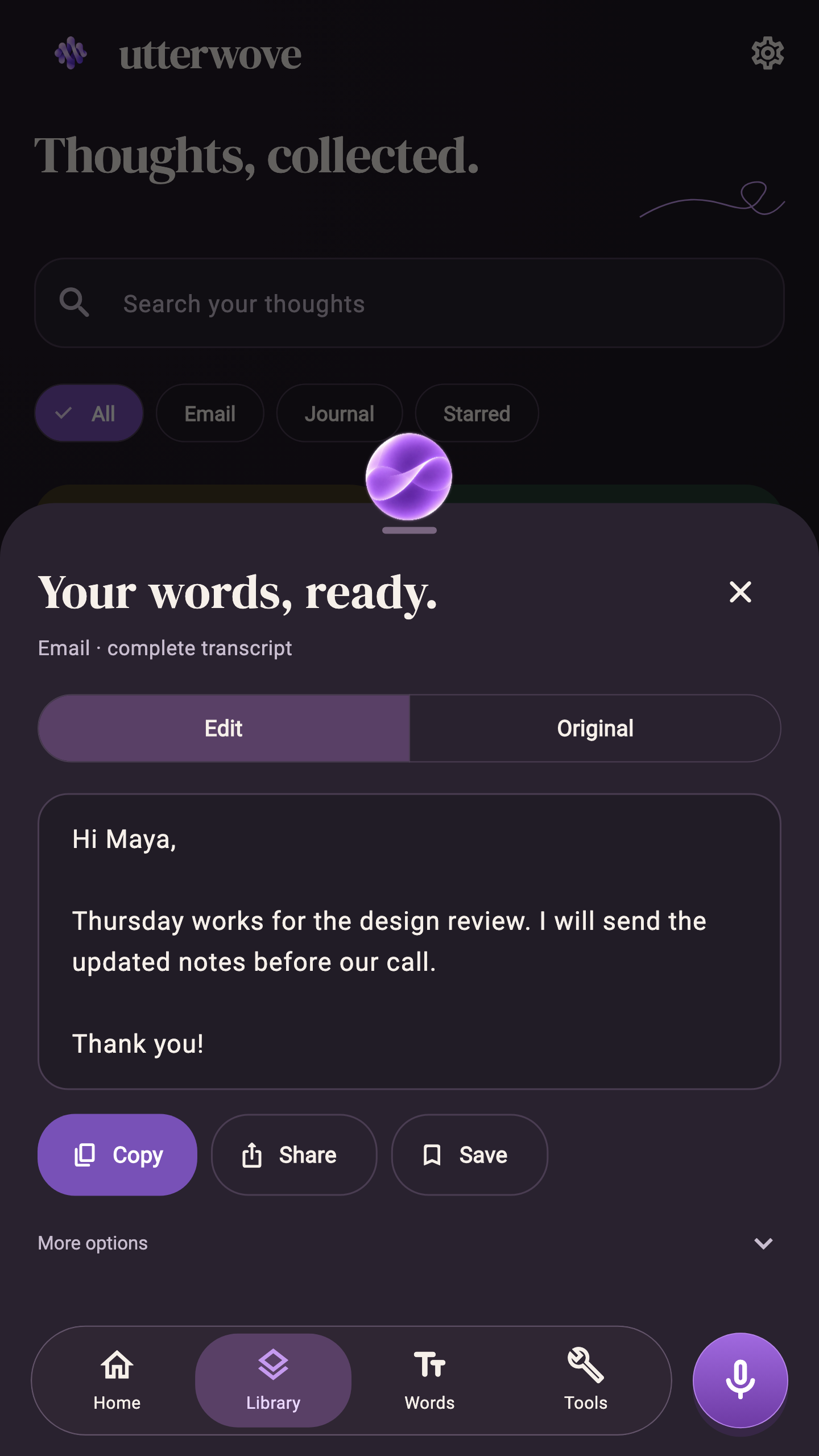
Write a friendly email to my client Maya. Confirm Thursday's review, mention the notes are coming today, keep it under 80 words and end warmly.
The second one tells the AI who the email is for, what it must say, how long it should be and what tone to use. You did not need prompt engineering skills to write it. You just talked the way you would brief a colleague. Typing that on a phone keyboard feels like work, so we skip it, and then we spend three more messages correcting the answer.
A five-part structure to say out loud
You do not need to memorise a framework. If you cover these five things, in any order, most prompts get better.
| Part | What to say | Example |
|---|---|---|
| Goal | What you want produced | "Write a summary of this article..." |
| Context | What the AI cannot know | "...for my team, who missed the meeting..." |
| Audience | Who will read it | "...they are engineers, so skip the basics..." |
| Format | Shape of the answer | "...five bullet points, then one next step..." |
| Limits | Length, tone, things to avoid | "...under 120 words, no jargon, no emoji." |
A good habit: take five seconds to think of the goal, then just start talking. You will cover most of the parts naturally. If you forget one, add it at the end ("Oh, and keep it under 100 words"). The AI does not mind an afterthought.
The workflow: speak, review, paste
- Speak the prompt in a dictation app, in a plain mode that keeps your literal words.
- Review the transcript. Fix names, numbers and anything the model misheard. Delete obvious false starts.
- Copy it.
- Paste it into ChatGPT or whichever AI tool you use, and send.
The review step is the point. A misheard name or number in a prompt quietly becomes a wrong name or number in the answer. Reading twenty seconds of text catches that.
In Utterwove, the transcript opens in a tray where you can edit, copy, share or save it, and the original transcript is kept next to your edited version.
[VIDEO: V40-ai-prompts-by-voice — upload the 16:9 ANDROID-NOW file to YouTube and embed here]
Why not just use the AI app's voice button?
Fair question. Many AI apps have voice input or a voice conversation mode, and for quick questions they work well. A separate dictation step helps in a few cases:
- You want to see the text before it is sent. Some voice modes send as soon as you stop talking.
- You reuse prompts. A searchable history means your best prompts are saved and easy to find next week.
- You use names and jargon. A personal dictionary can fix the same misheard word every time, across apps.
- You switch between AI tools. One dictation habit works for every tool you paste into.
If none of these matter to you, use the built-in button. Fewer steps is a fine reason.
Where your words go
This is worth being clear about. In Utterwove, speech recognition can run on your phone with downloaded on-device models. But once you paste a prompt into an AI service, that text goes to that service under its own terms, like anything you type there. Dictating first does not change that.
Utterwove also has optional AI writing modes, including an Assistant mode, that work through a text provider you connect yourself. If you use those, your text goes to that provider, and the provider may charge you separately. Plain Dictation, and the local Email and Journal formatting, do not need an AI key.
Templates you can say out loud
Read these once, then say them in your own words.
Email: "Write an email to [name] about [topic]. They need to know [key facts]. Tone: [warm / formal]. Keep it under [number] words and end with [ask]."
Summary: "Summarise the text I am about to paste for [audience]. Give me [number] bullet points and one sentence on what to do next. Skip [what you don't need]."
Learning: "Explain [topic] to me as if I know [your level]. Use one everyday example, then give me three questions to test myself."
Coding (for an AI coding assistant): "In this function, [what happens]. I expected [what should happen]. I already tried [what you tried]. Suggest the smallest change and explain why."
Planning: "Help me plan [task] by [date]. I have [hours] a week. List the steps in order and flag anything that usually takes longer than people expect."
Tips for cleaner spoken prompts
- Say numbers deliberately. "Under eighty words" is clearer than mumbling a quick number.
- Pause between parts. A short pause gives you cleaner sentences in the transcript.
- Add product names and people to a dictionary. If you often prompt about the same project, a phrase replacement saves fixing it every time.
- Keep the literal mode for prompts. You want your words, not a rewritten version of them, going to the AI.
FAQ
Can I just talk to ChatGPT directly? Yes. ChatGPT and many other AI apps have voice input. Dictating separately is useful when you want to review the text first, keep a history of prompts, or reuse them across tools.
Does Utterwove send my prompt to OpenAI? No. Utterwove does not send your dictation to any AI service unless you paste it there yourself, or you connect your own provider for the optional AI writing modes.
Do spoken prompts get better answers? Often, because spoken prompts tend to include more context. It is not guaranteed. The answer still depends on the AI tool and on what you asked.
Can I dictate prompts in Hindi or Telugu? Utterwove's multilingual models list both. Whether the AI tool answers well in that language depends on the AI tool. Test with a short prompt first.
Try it with your next prompt
Next time you open an AI app, try saying the prompt instead of typing it, and compare the answers.
If you want a dictation app for this on Android, Utterwove has a 7-day free trial and then a one-time ₹470 Lifetime Pro (about US$5). It is on Google Play. iPhone, iPad and Mac versions are coming soon.
Disclosure: I am the developer of Utterwove (Kriva Studio, India). ChatGPT is a product of OpenAI; Utterwove is not affiliated with OpenAI. This article was drafted with AI assistance.