Utterwove

How to apply this guide
Five study workflows where talking beats typing, what voice typing cannot do for you, and how to stay inside your school's rules.
Start with
Choose a concrete task and a destination you can review. A draft is safer than an immediately sent message.
Check before you finish
Save a useful dictionary rule or mode only after the workflow has worked on a representative test.
Evidence to keep: Keep the target field open and verify that the complete reviewed result reached the intended destination. This page’s key limit is: Speech to text for students: five ways to use voice typing for notes, essay drafts and revision on Android, plus what it can't do and your school's rules.
TL;DR: Speech to text is useful for students in five places: getting a first draft out, turning a messy brain dump into an outline, explaining a topic out loud to check you understand it, recapping a lecture in your own words, and sending the small messages that eat your study time. It is not a lecture recorder, it will not write your essay for you, and you should check your school's rules before you use any AI rewriting. Below is how I would set it up on an Android phone, with a free option and a paid one.
Why talking helps when you study
Most of us think faster than we type, especially on a phone. When you type on a small screen, you tend to cut your thoughts short. When you talk, you naturally add the "because" and the "for example". That extra material is exactly what an essay draft or a revision note needs.
Talking also exposes gaps. If you try to explain photosynthesis or supply and demand out loud and you stall, you have found the part you need to revise. Typing lets you hide behind half-sentences. Speaking does not.
None of this needs special talent. It needs a quiet corner, a phone, and the habit of reviewing what the app wrote.
Typing vs talking for common study tasks
| Task | Typing on a phone | Talking | What to watch |
|---|---|---|---|
| First draft of an essay section | Slow, and you edit while you write | You get the whole argument out in one go | Expect to rewrite. A draft is a draft |
| Brain dump before planning | Short fragments | Long, connected thoughts | Pull out the main points afterwards |
| Revision: "explain it back" | Easy to skip the hard part | You notice where you stall | Check facts against your notes |
| Lecture recap | Tiring after a long day | Two minutes while walking out | Your words, not the lecturer's |
| Messages to your group | Fine for one line | Faster for longer updates | Read before you send |
Five workflows that work
1. The two-minute brain dump
Before you plan an essay, record two minutes of everything you know and think about the question. Do not organise it. Then read the transcript and highlight three or four ideas that could be paragraphs.
2. Draft one section at a time
Once you have an outline, dictate one section per recording. Say the point, the evidence, and why it matters. Short recordings are easier to review than one long ramble, and the end of a recording is where words most often get lost.
3. Explain it back
Pick a topic from your syllabus and explain it out loud as if to a friend who missed the class. Then read the transcript next to your notes. Anything wrong or missing goes on your revision list. This is a study technique first and a dictation trick second.
4. Recap the lecture in your own words
Speech to text apps like Utterwove are built for dictating your own words, not for recording a whole lecture. Right after class, record a two-minute recap of what you understood. If you want a full recording of a lecture, ask the lecturer first and use a recorder app made for long recordings.
5. Clear the small messages
Group project updates, emails to a professor, a note to a hostel warden. These are small, but they add up. Dictate them, read them once, send. If an email needs a proper greeting and paragraphs, an Email formatting mode saves a step.
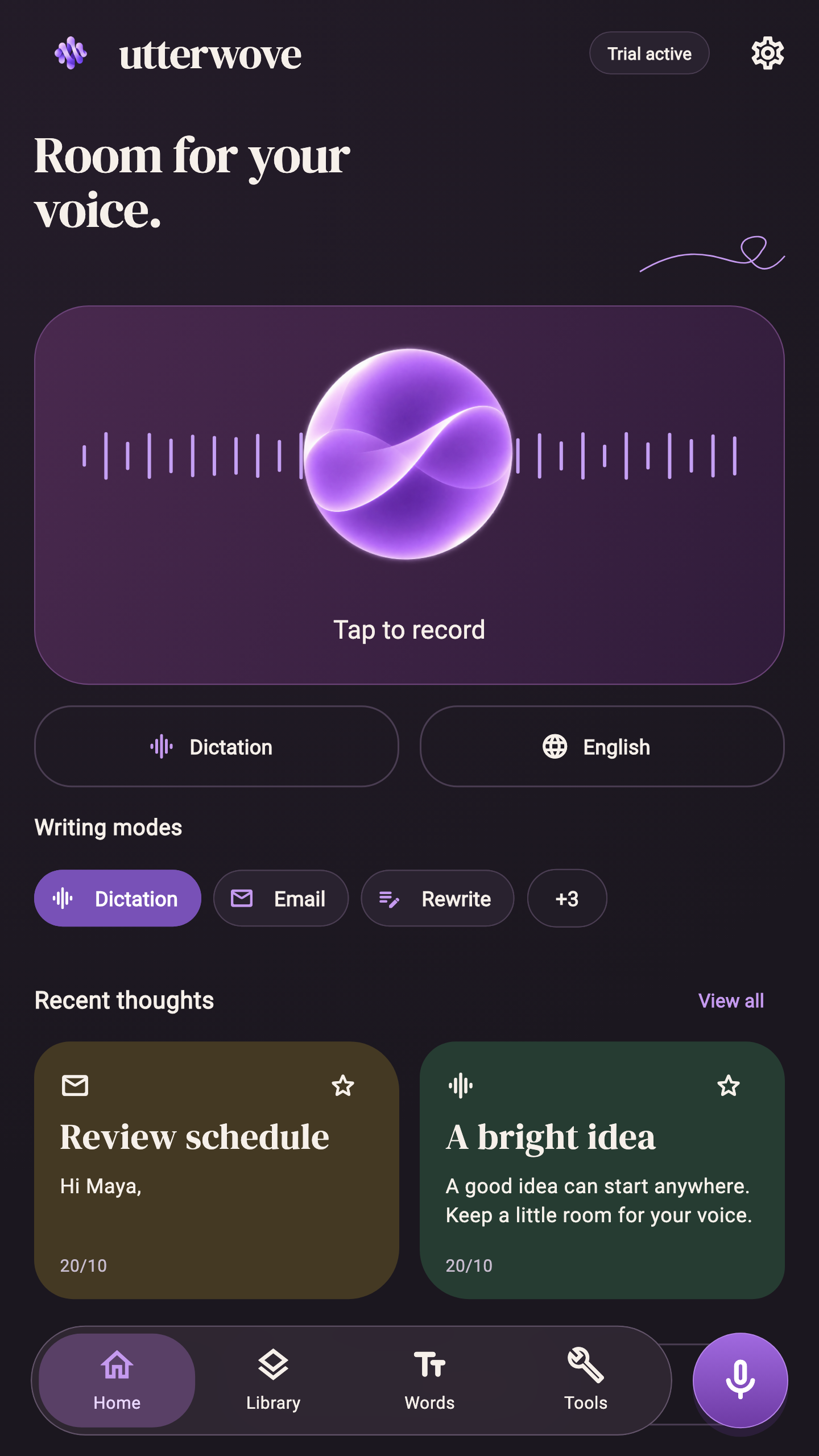
Here is what the record screen looks like
In Utterwove on Android you tap the large record area, speak, and get a transcript you can edit, copy or share. You pick a writing mode (Dictation for your literal words, or Email or Journal for structure) and your speech language before you start.
[VIDEO: V17-typing-vs-talking-email — upload the 16:9 ANDROID-NOW file to YouTube and embed here]
Offline helps in hostels and libraries
Campus Wi-Fi is not always reliable. Utterwove can download on-device speech models (Whisper Tiny or Base multilingual, and Parakeet on phones with enough memory), so dictation keeps working without a connection once the model is downloaded. Download it on good Wi-Fi, then test it in airplane mode before you depend on it.
Libraries are a different problem: you should not be talking there. Dictate in your room, on a walk, or in a group study room, and use the library for reading and editing.
Stay inside your school's rules
This part matters. Plain dictation writes down your own words, so it is usually no different from typing them. AI rewriting is different. Utterwove's Dictation, Email and Journal modes run locally and need no AI key. Other modes, such as Rewrite, use an AI provider you connect yourself. Many schools and universities have rules on AI tools in assessed work. Read yours before you use any rewriting on coursework, and when in doubt, stick to plain dictation and do the editing yourself.
Free first, then decide
You may not need to pay anything. Gboard's built-in voice typing is free on most Android phones and handles many languages. Try it for a week. If you find you want offline models, a searchable history of your recordings, a personal dictionary for subject terms and names, or Email and Journal formatting, then a dedicated app may be worth it.
Utterwove has a 7-day free trial (plus one optional 7-day extension), then a one-time Lifetime Pro: ₹470 on Google Play India, about US$5. There is no subscription, which helps on a student budget. Multilingual models list Hindi and Telugu, though support varies by model and device, so test your language during the trial.
FAQ
Can I use speech to text to record my lectures? Utterwove is made for dictating your own words, not for recording long lectures. Ask permission before recording anyone, and use a recorder app built for long sessions if you need a full recording.
Is dictating an essay cheating? Dictating your own words is generally treated like typing them. AI rewriting may not be allowed for assessed work. Check your school's policy on AI tools.
Does voice typing work offline? With on-device models, yes, once the model is downloaded. Sign-in and optional AI provider features still need the internet.
Can I dictate in Hindi or Telugu? The multilingual models list both. Accuracy varies by model, device and how you speak, so test with your own notes during the free week.
Try it on your next assignment
If you want to try these workflows, Gboard is the free place to start. If you want offline models and a searchable history, try Utterwove.
Utterwove has a 7-day free trial and then a one-time ₹470 Lifetime Pro (about US$5). It is on Google Play. iPhone, iPad and Mac versions are coming soon.
Disclosure: I am the developer of Utterwove (Kriva Studio, India). This article was drafted with AI assistance. Results vary with voice, language, device and model.